This page is for you if you hand your iPhone to other people fairly often - a kid who wants to play a game, a friend borrowing it to snap a photo, a coworker glancing over your shoulder - and you want a handful of specific photos to simply not be there when that happens. You're not hiding anything illicit; you want ordinary privacy: gift photos before a birthday, a screenshot of a document, photos of an ex, an ID card, a receipt. Maybe you've already tried iOS's built-in 'Hidden' album and found out it isn't private at all - anyone who knows to flip a toggle in Settings > Photos can unhide it. What you're looking for is an actual locked photo app for iPhone, one where finding the photos takes more than knowing where to tap.
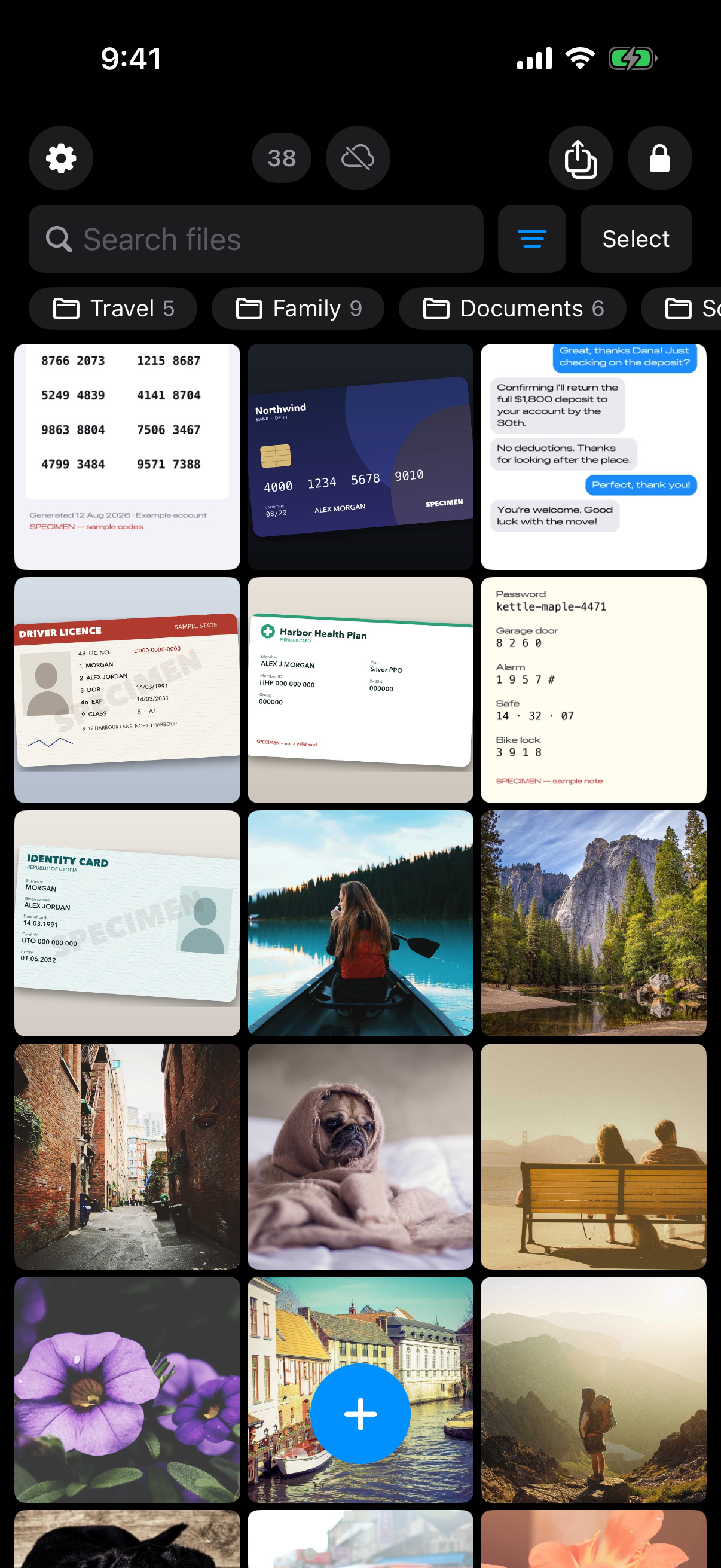
Screenshots, ID cards, receipts and personal photos kept together inside one vault.
What is hard right now
- People borrow my phone constantly - my kid wants a game, a friend wants directions - and one swipe too far in Photos and they're looking at something I'd rather they weren't.
- I don't want to explain why a photo is private. I just want it to not be there when someone else is holding my phone.
- The iPhone's 'Hidden' album isn't actually hidden - it's one setting away from anyone who thinks to look for it.
- If I ever lose my phone, sell it, or trade it in, I don't want a stranger able to see anything I'd locked away.
Scenarios
Handing your phone to your kid
Your kid asks to play a game, or wants to take a quick selfie, and reaches for your phone. They open Photos looking for something - the game icon, the camera button - and a few swipes later they've landed somewhere you didn't intend: a screenshot, an old photo, something that was never meant for them.
Weave Vault removes that possibility at the source. Photos you move into a vault aren't hidden inside the Photos app with a toggle standing between them and anyone curious enough to look - they live in a separate, pattern-locked vault that isn't part of your camera roll, your Recents, or Photos search at all. There's nothing in the library your kid is swiping through for a stray swipe to land on, because the photo was never there to begin with.
If your kid ever opens the Weave Vault app itself out of curiosity and taps in a pattern, an unrecognised pattern just opens a fresh, empty vault - not an error message, not a 'wrong password' screen that tells them they're close. There's no signal that a second, real vault exists at all.
A friend takes a photo on your phone
You're at dinner and a friend grabs your phone to snap the whole table, then flips into the camera roll afterward to check how the shot turned out. A few swipes past that new photo is enough to land somewhere private.
The fix has to happen before that moment, not during it. Move anything you'd rather a friend not stumble across into a Weave Vault beforehand - sealed with AES-256-GCM behind its own pattern - and the camera roll they flip through afterward never contained it in the first place. There's no folder to avoid and no 'don't scroll too far' moment to manage, because the photo simply isn't part of the library they're looking at.
That's the difference between hiding something and it not being there: your friend sees exactly what any camera roll looks like, with nothing set aside or flagged, because from the Photos app's point of view, nothing was ever set aside.
Selling or trading in your iPhone
Before you wipe the phone for a trade-in, you're left wondering whether photos you deleted - or ones an old iCloud or iTunes backup captured - could actually resurface for whoever gets the device next.
Anything sealed in a Weave Vault is protected by a key hierarchy, not just a delete button: your pattern derives a key through Argon2id, which unlocks a key-encryption key, which in turn unlocks a per-vault content key that actually decrypts your files - each one sealed with AES-256-GCM. Weave Vault is also excluded from the phone's ordinary iCloud or Finder backup by design, so a routine backup of the phone - the kind a buyer or a restore from your old backup could pull from - never contained your vault contents to begin with.
We make no claim about what an examiner with the physical device could or could not determine. What we can say is that a normal backup, a factory reset, or someone poking through Photos after a trade-in isn't a path to your vaulted files.
Features that make this work
Pattern unlock
No password to type where someone can watch you type it. The pattern is never written to disk - not to a file, not to the Keychain - and an unrecognised pattern just opens a fresh empty vault instead of throwing an error, so there's no 'wrong password' moment for anyone watching over your shoulder.
Multiple vaults
Keep one vault for whatever you're fine with anyone seeing, and a second one - with a different pattern - for what you're not. Free tier covers up to 3 vaults, and the app keeps no vault list or count, so there's no menu hinting a second vault even exists.
Encrypted backup
If the phone that everyone borrows is also the only copy of these photos, losing it means losing them. Backup copies only ciphertext to your own iCloud or Google Drive - no vault key and no plaintext ever leaves the device. Enabling backup requires Pro; restoring never does.
Secure sharing
Sometimes you do want to hand one set of photos to one specific person - a co-parent, a sibling - without opening your whole vault or asking them to pay for anything. Sharing sends a point-in-time copy, re-keyed from scratch, with an expiry you set and the ability to revoke it early.