
You hand your iPhone to your kid several times a day, a game to keep them quiet in the car, a video at bedtime, the camera to snap something at the park, and you don't think twice about it until you remember what's sitting a swipe away in the Camera Roll: screenshots of bank statements, a photo of a passport, pictures you just haven't sorted through. iOS gives you a 'Hidden' album, but it isn't really private; a kid who knows to ask Siri or poke around Settings finds it in minutes. What you want isn't a bigger warning label on your phone, it's a place for the photos you don't want a browsing seven-year-old to land on, one that doesn't announce itself and doesn't depend on you remembering to hide anything in the moment.
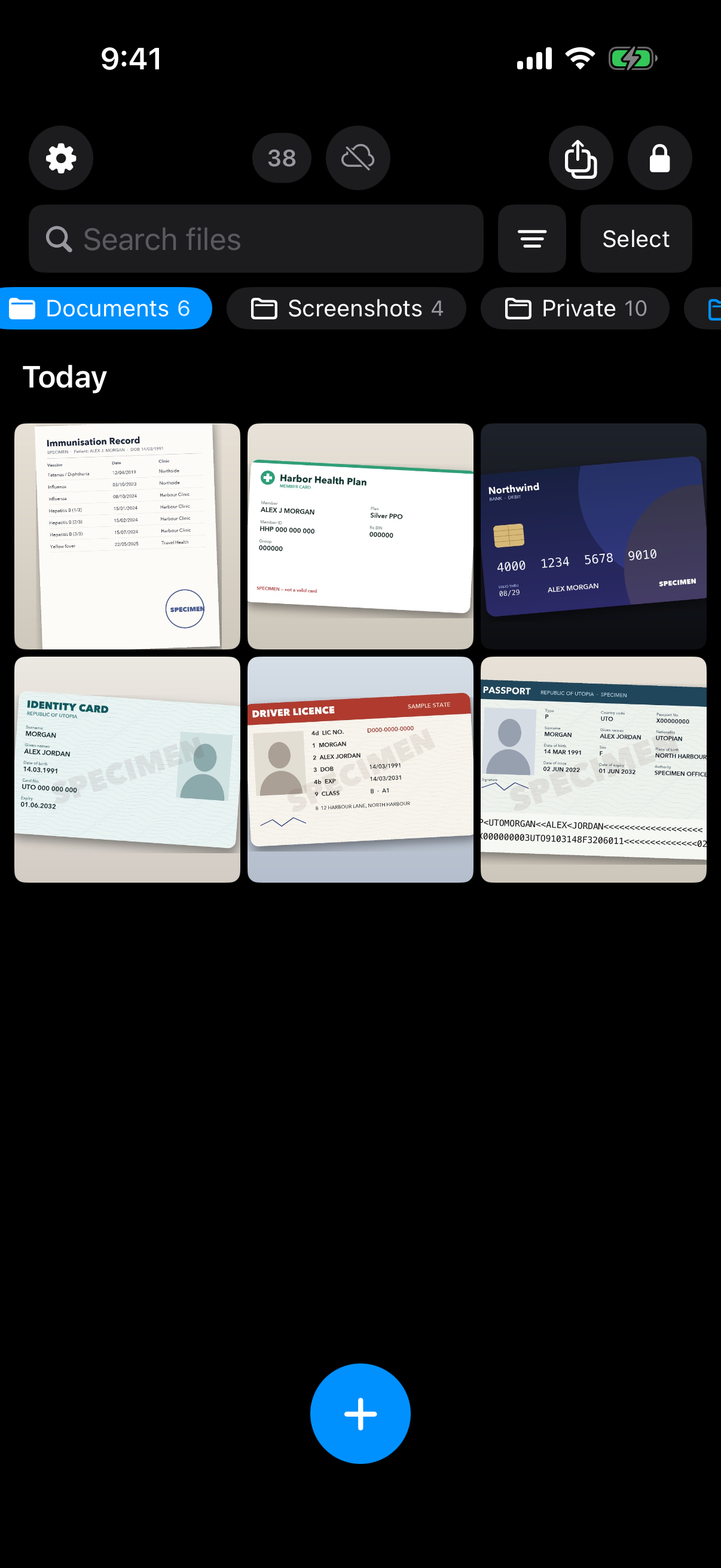
Documents like a passport photo or a bank card can live in their own folder inside the vault, out of the Camera Roll.
What is hard right now
- I hand my phone to my kid for a game or a video and I'm already bracing for what they might swipe into by accident.
- iOS has a built-in 'Hidden' album, but my kid found it in two minutes just by asking Siri or poking around Settings, it isn't actually private.
- When my kid takes a few photos at the park with my phone, scrolling back through the Camera Roll to find them can surface older, more personal photos I forgot were even there.
- I don't want to have to remember to hide something new every single time before I hand the phone over, it needs to just already be somewhere they can't reach.
Scenarios
Handing over the phone for a game or a video
Your kid asks for the phone to play a game or watch something before bed. On an iPhone, opening any app is one tap from the home screen, and that includes Photos, so whatever is sitting in your Camera Roll is one accidental swipe away from a kid who is just trying to find the game icon.
WeaveVault keeps its contents in a separate app, not inside Photos, so there's nothing to swipe into from the Camera Roll in the first place. The app itself opens only to a pattern you draw on a grid, and that pattern is the vault's only credential, there's no separate passphrase or PIN to type where a kid could watch your fingers and remember it.
The pattern is run through Argon2id (t=3, m=64 MiB) before it's used to derive anything, and it's never written to disk, not to a file, not to the Keychain. There's simply nothing stored on the phone for a curious kid to find by digging through Settings.
Taking photos at the park or the pool
Your kid takes a burst of photos of the swings or the diving board on your phone, then wants to see them right away and starts scrolling back through the Camera Roll, past whatever you shot before the outing, a receipt you photographed, an old screenshot, a photo you forgot to delete.
WeaveVault keeps sensitive photos out of that Camera Roll entirely, so scrolling back through the regular gallery can't surface anything sitting in the vault, because it was never there. Each vault's contents are sealed with AES-256-GCM, with a fresh random nonce and authentication tag generated per file, and the key that protects them is a random 256-bit content key generated per vault, not something derived on the fly from the pattern you drew, so it can't be guessed or reconstructed from the pattern alone.
That separation holds regardless of how many photos your kid takes or how far back they scroll. The Camera Roll only ever contains what you chose to put there.
After the built-in Hidden album stopped working
Your kid found the iOS Hidden album, maybe by asking Siri, maybe by poking around Settings, and now it isn't private anymore. What you need next is a space that doesn't tip its hand even to a determined kid who's willing to guess.
If someone enters a pattern WeaveVault doesn't recognize, the app doesn't show an error or a 'wrong pattern' message. It opens a fresh, empty vault instead. There's no vault list, switcher, or count anywhere in the app, so a kid trying pattern after pattern out of curiosity just keeps landing on empty vaults, never a hint that a real one, or anything at all, exists behind a different pattern.
That's a structural difference from a hide-and-seek feature buried in Settings: there's no menu to discover, no toggle that reveals a hidden album exists. The vault only ever shows what the correct pattern was set up to open.
Features that make this work
Pattern unlock
The vault's only credential is a pattern you draw, run through Argon2id (t=3, m=64 MiB) before it ever touches a key. There's no separate passphrase to type where a kid could watch your fingers, and the pattern itself is never written to disk, not to a file, not to the Keychain.
Multiple vaults
An unrecognized pattern opens a fresh empty vault instead of showing an error, and the app keeps no vault list, switcher, or count. A kid trying pattern after pattern out of curiosity just finds empty vaults, never a sign that something else is hidden behind a different one.
Encrypted backup
Your vault is excluded from your phone's ordinary iCloud or Finder backup by design, so a routine backup of the phone never contains it. Turning on backup for these photos requires Pro; restoring an existing backup never does, and browsing or exporting your own files works whether or not you subscribe.